You are on site. The device is wired, the BMS is waiting, and one register refuses to show up. What you need right now is a Modbus tester: a small tool that talks to the device and shows you exactly what comes back.
This guide explains what a Modbus tester does, what to look for, and how to test a Modbus RTU device in a few minutes. We also show you ModbusMate, the free Modbus tester our team built. It runs in your browser, so there is nothing to install.
What is a Modbus tester?
A Modbus tester is software that acts as the master on a Modbus network. It sends requests to a device (the slave) and shows the answers. You use it to check that a device is alive, that its settings are right, and that its registers hold the values you expect.
Think of it as a multimeter for the bus. A multimeter tells you if there is voltage. A Modbus tester tells you if there is a conversation, and what was said.
Most devices in building automation speak Modbus RTU over RS-485. Some use Modbus ASCII or RS-232. To reach them from a laptop, you need two things:
- a USB to RS-485 (or RS-232) adapter, and
- Modbus tester software that can open that serial port.
The protocol itself is open. You can read the official documents on the Modbus Organization specifications page.
When do you need a Modbus tester?
More often than you think. Here are the jobs we see every week:
- Commissioning. System integrators check each device on an RS-485 trunk before handover.
- Bench testing. Firmware and hardware developers validate a register map before a product ships.
- Troubleshooting. BMS and controls teams find out why a device stopped answering.
- Service visits. Technicians need a reliable tool on whatever laptop is at hand, even a locked-down company machine.
In all four cases, the question is the same: what is really happening on the bus? Guessing costs hours. A tester shows you in seconds.
If your problem is a sensor that gives no answer at all, our guide to Modbus sensor communication errors lists the usual causes.
What a good Modbus tester should do
Not every tool covers the same ground. Before you pick one, check it against this list.
Poll more than one thing at once
Real jobs need several views. You may want setpoints in one window and alarm bits in another. A good tester lets each window have its own slave ID, function code, start address, quantity and poll rate.
Show every byte on the wire
When values look wrong, you need the raw frames. Look for a traffic log in hex, with checksum checks: CRC for RTU and LRC for ASCII. Counters for errors and round-trip time help too. They turn a “noisy line” from a hunch into a number.
Decode values without a calculator
A register holds 16 bits. A temperature might use two registers as a 32-bit float. And devices do not agree on byte order. Your tester should show signed and unsigned integers, floats in every byte order, and scaled values in real units.
Handle the address puzzle
One manual says the first holding register is 0. Another says 40001. A good tester lets you switch between 0-based and 1-based addressing. Then the numbers on screen match the datasheet in front of you.
Send exactly the frame you want
Sometimes you need to send one specific request, such as a diagnostic or a device ID query. A raw frame builder saves you from writing code just to test one function code.
Find devices you did not know about
Old buildings come with old documentation, or none. A scan that walks through unit IDs shows which slaves answer. It maps a bus in minutes.
Record and prove
A commissioning report needs evidence. Charts, logs and export to CSV or Excel turn a test session into something you can attach.
Stay safe on live systems
One wrong write can open a valve or stop a fan. On a running building, you want a mode that blocks every write.
Desktop software or a browser-based Modbus tester?
For years, Modbus tester software meant an installer for Windows. That still works for many people. But it brings friction on the job:
- You hunt for the one laptop that has the licence.
- You wait for IT to approve an install.
- You find out the tool only runs on Windows, and you brought a Mac.
A browser-based tester removes those steps. Modern Chromium browsers support the Web Serial API. It lets a web page talk to a serial port after you pick the port and allow access. The MDN Web Serial API reference explains how it works.
There is one honest limit. Web Serial is not available in every browser. Firefox and Safari do not support it, and neither do phones or tablets. So a browser tester runs on a desktop or laptop, in Chrome, Edge or Opera.
Want to compare the classic desktop tools? Our earlier article on Modbus testing tools for sensors covers the options.
Meet ModbusMate: a free Modbus tester in your browser
We build HVAC room devices with Modbus RTU at Andivi in Slovenia. We test our own hardware every day. So we built the tool we wanted to use, and made it free for everyone. It is called ModbusMate.
Plug a USB to RS-485 adapter into your laptop, open Chrome or Edge, and you can poll registers, read the raw traffic and chart live values. There is no installer and no licence.
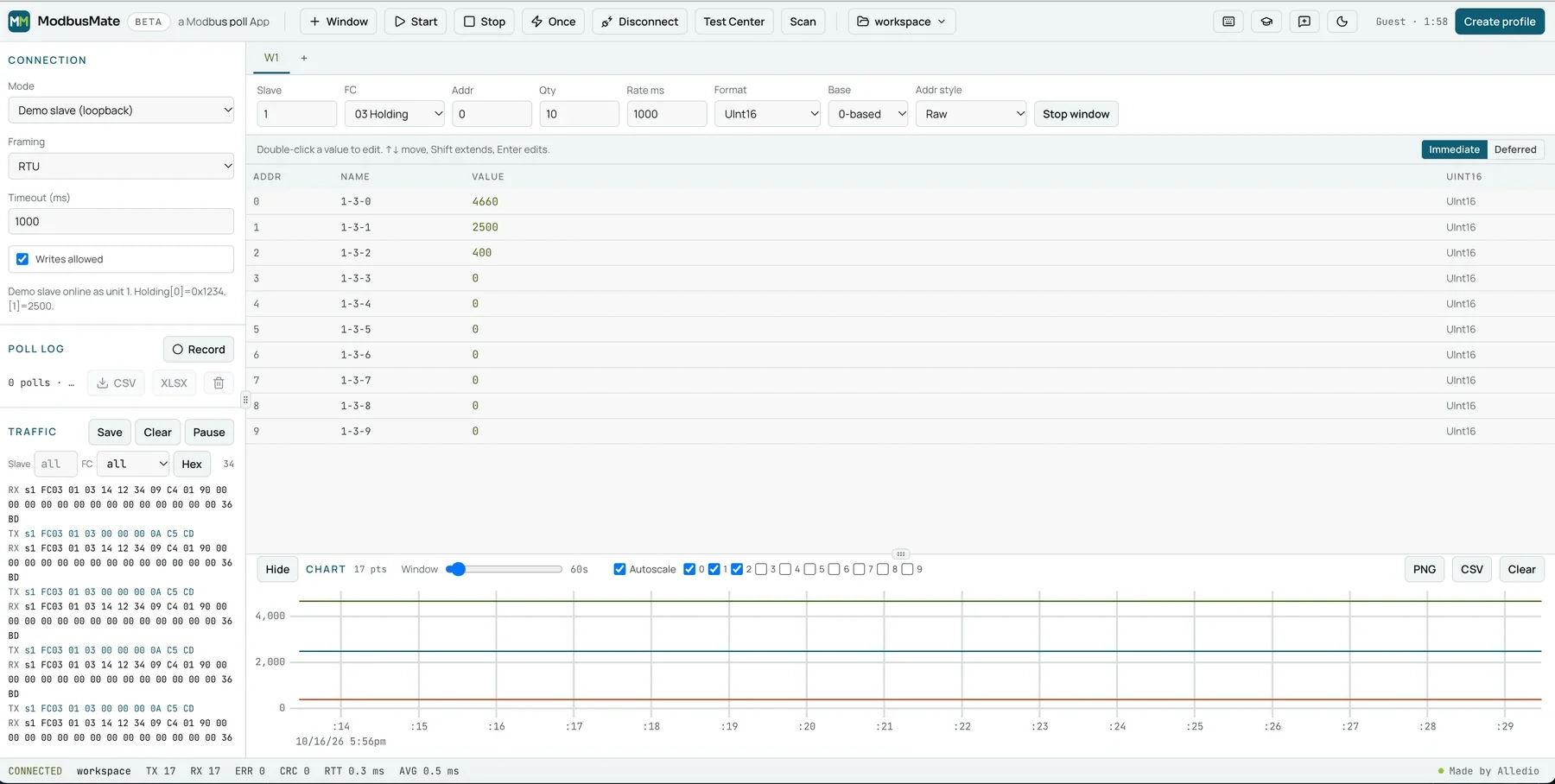
Here is how ModbusMate covers the checklist above:
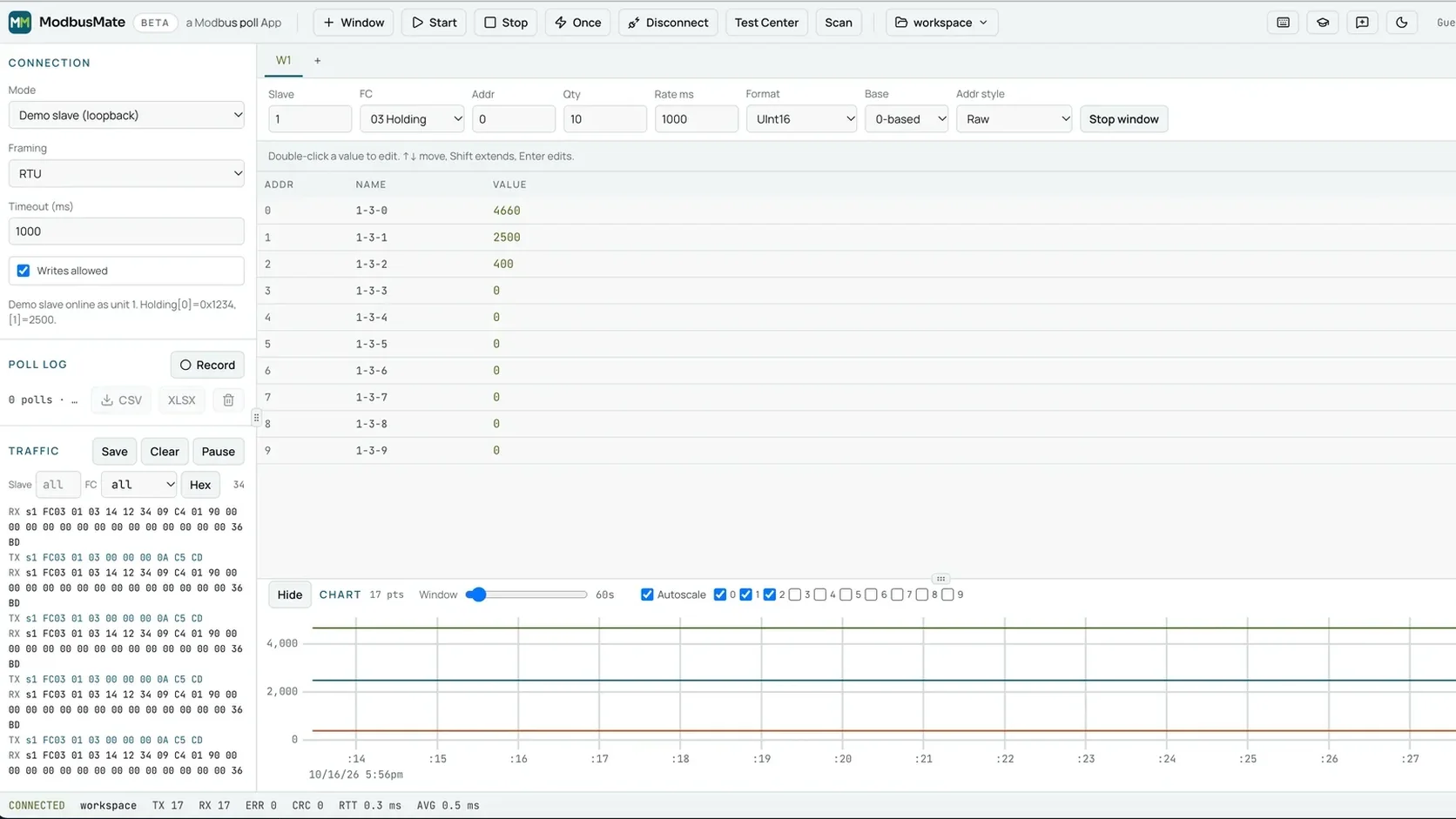
- Multi-window polling. Open as many poll windows as you need. Each has its own slave ID, function code, start address, quantity and poll rate. F5 starts all windows, F6 stops them and F8 reads once.
- Traffic log with checksum checks. Every request and response appears in hex, with CRC (RTU) or LRC (ASCII) checks. You can filter by slave and function code. The status bar counts TX, RX, errors, CRC failures and round-trip time.
- Data formats. Signed and unsigned 16, 32 and 64-bit integers. Float32 and Float64 in all four byte orders: ABCD, CDAB, BADC and DCBA. Plus hex, binary, boolean and ASCII.
- Scaling. The Scaled format applies a × raw + b, so tenths of a degree read as real degrees.
- 0-based or 1-based addressing. Set the base and the address style to match the datasheet.
- Test Center. Build raw requests with presets for function codes 01 to 06, 08, 0B, 0F, 10, 11, 16, 17 and 2B.
- Device scan. Run through unit IDs and see which slaves answer.
- Live charts. Tick registers to trend them. Export the chart as PNG or CSV.
- Logging. Press Record, then export the poll log to CSV or XLSX.
- Monitoring only. Untick “Writes allowed” and every write is blocked.
- Saved workspaces. Ctrl+S saves windows, register names and connection settings. JSON import and export let you share a site setup.
How to test a Modbus device in three steps
You do not need a long setup. This is the whole process.
Step 1: Connect your adapter
Plug a USB to RS-485 or RS-232 adapter into your computer and wire it to the device. Any adapter that your operating system shows as a serial port will work. Common adapters use FTDI, CP210x or CH340 chips.
Testing several devices on one cable? Check the wiring basics in our guide to Modbus daisy chain connections.
Step 2: Open ModbusMate and pick the port
Open the app in Chrome, Edge or Opera. Choose the serial port. Then set the baud rate (300 to 3,000,000), parity, stop bits, and RTU or ASCII mode.
These settings must match the device exactly. If you are not sure what they should be, read our article on key Modbus settings for sensor configuration.
Step 3: Poll, read and log
Add a poll window. Enter the unit ID and the register range. Then watch the values, the traffic and the counters update live. Values that arrive turn green, so you know at a glance that the device is answering.
When it works, press Ctrl+S to save the workspace. Next visit, Ctrl+O brings it all back.
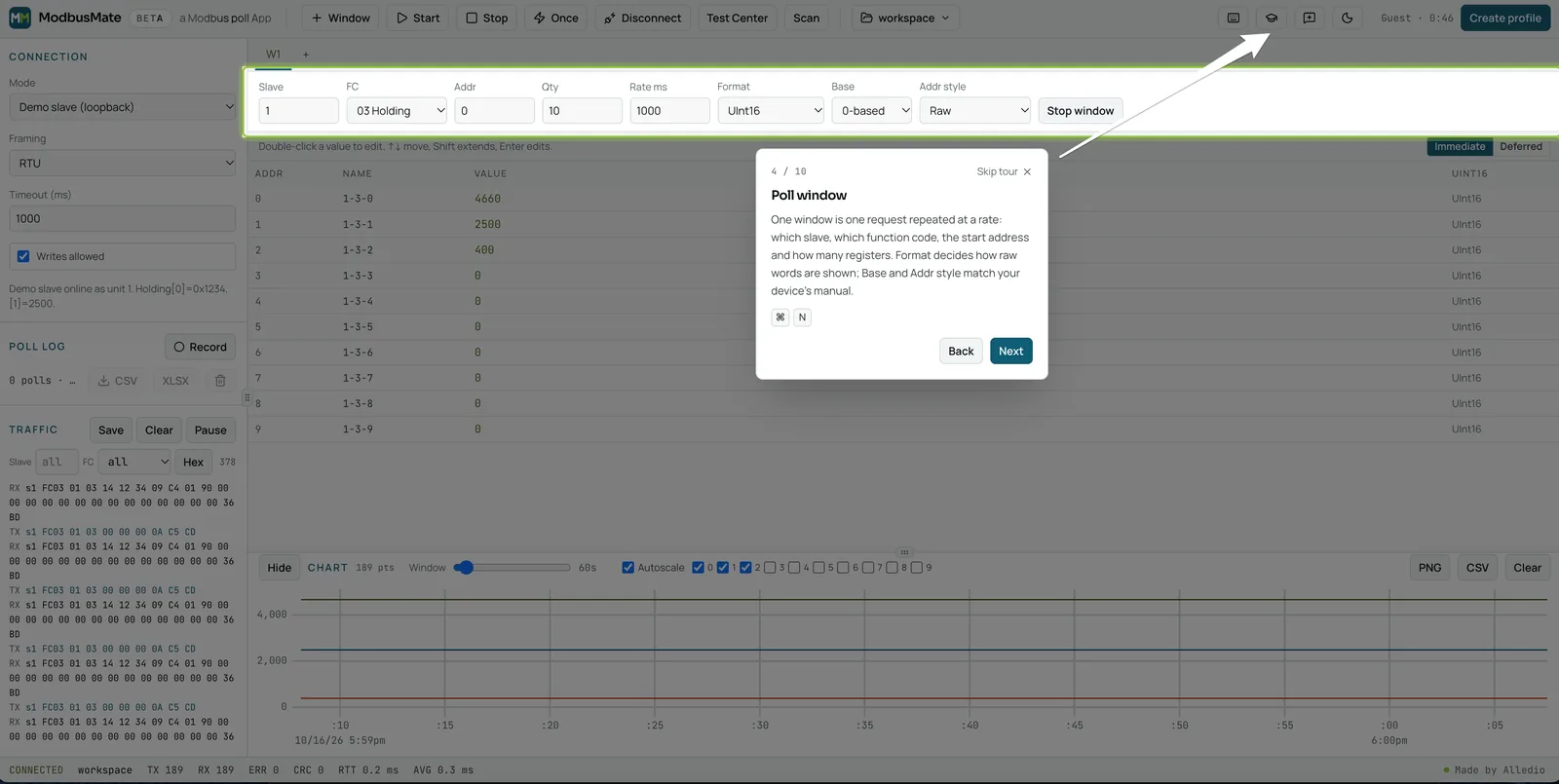
No device yet? Practise on the demo slave
Sometimes the hardware has not arrived. Or you want to show a colleague how Modbus works. Pick Demo slave (loopback) as the connection mode. A simulated device answers as unit 1.
There is also a 10-step guided tour. It starts by itself on your first visit, on a screen at least 720 px wide. It walks through the connection settings, a poll window, the register grid, the chart, the traffic log and saving a workspace. On the demo slave, it can even connect and start polling for you. You can restart it any time with the Take the tour button (the graduation cap).
Four quick checks when a device does not answer
A Modbus tester shines when something is wrong. Use it like this:
- Look at the TX and RX counters. TX rises but RX stays at zero? The device is not answering. Check wiring, slave ID, baud rate and parity.
- Watch for CRC failures. Answers arrive but fail the checksum? That points to a noisy line or a settings mismatch.
- Run a scan. Not sure of the address? Let the scan show you which unit IDs reply.
- Change the format, not the device. A temperature reads as nonsense? Switch the byte order. In most cases one click fixes it.
Testing on a live building? Switch to monitoring only first. Then you can look around without risk.
Built for real site conditions
Plant rooms are dark, and basements have no signal. ModbusMate was designed with that in mind.
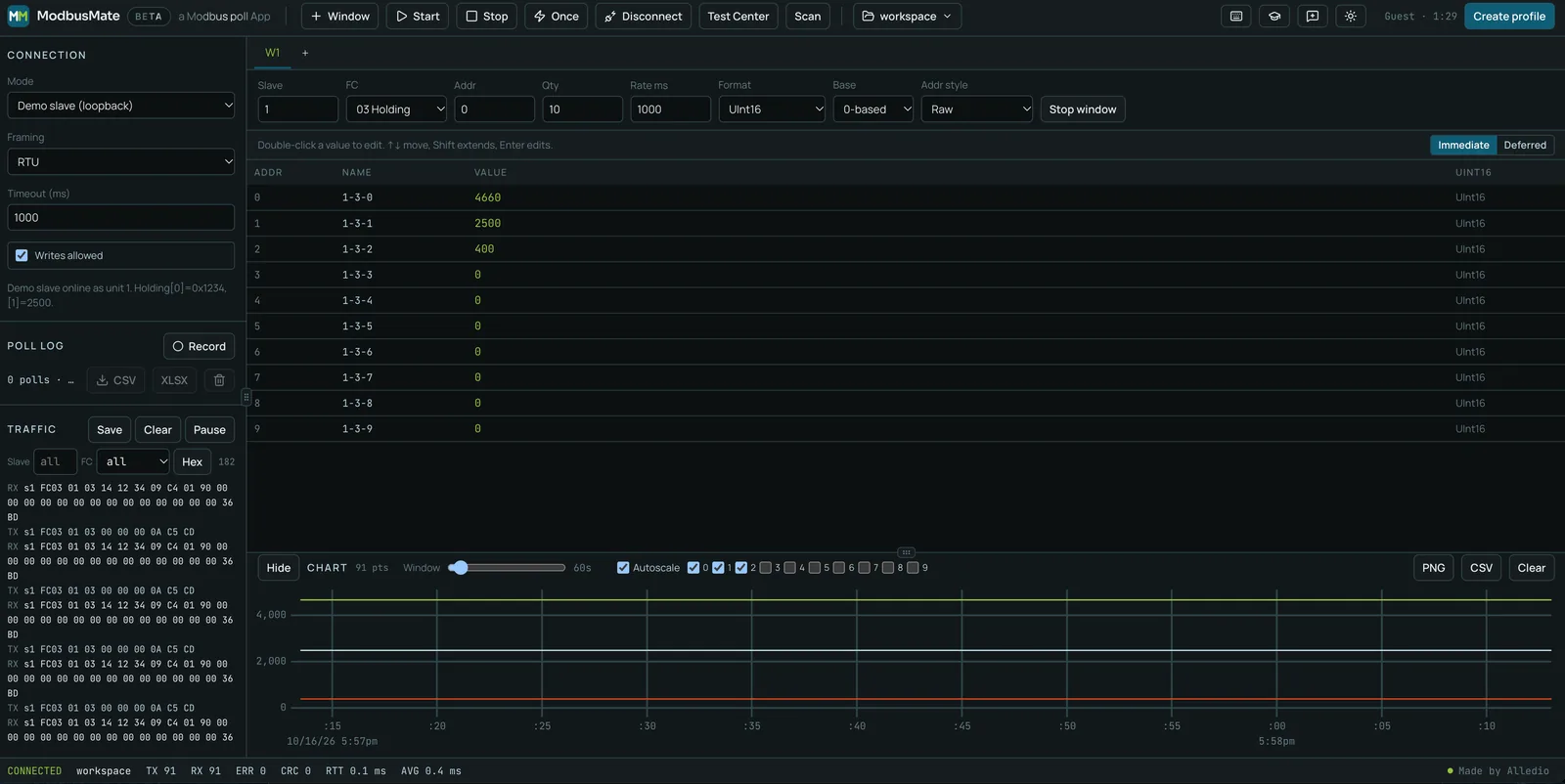
- Dark mode. One click in the toolbar switches to a dark theme that is easier on the eyes.
- Works offline. Once loaded, the app is cached in the browser and tells you when it is ready to work offline.
- Keyboard shortcuts. F5, F6 and F8 run polling. Ctrl+N, Ctrl+S and Ctrl+O handle windows and workspaces. On a Mac, Ctrl is Command.
What ModbusMate supports today
We prefer to be plain about limits. ModbusMate talks to serial devices through the Web Serial API, and that decides what works.
- Protocols: Modbus RTU and Modbus ASCII over RS-485 or RS-232. Modbus TCP is coming soon.
- Browsers: Chrome, Edge and Opera on desktop.
- Operating systems: Windows, macOS, Linux and ChromeOS.
- Not supported: Firefox, Safari, phones and tablets.
- Hardware: any USB serial adapter your computer shows as a serial port.
- Baud rates: 300 to 3,000,000.
If you need Modbus TCP today, a desktop Modbus master is still the right choice. For serial work, the browser is enough.
Is this Modbus tester really free?
Yes. You open the app and get a five-minute guest session right away. To keep going, you create a free profile with your name and email. There is no licence fee and no paid tier. It is free during the beta and will stay free after it.
Found a bug or have an idea? Click Send feedback in the toolbar and choose Bug, Idea or Question. Every report reaches the team that builds the app.
Made by the team behind Alledio devices
ModbusMate comes from Andivi, the Slovenian company that designs and builds Alledio HVAC room devices with Modbus RTU. If you are testing one of ours, it is a natural fit.
For fan coil and room control with configurable I/O, see the Alledio OEM Room Controller. For the full feature list and a side-by-side comparison with other tools, read the ModbusMate product page.
FAQ
What is a Modbus tester used for?
A Modbus tester acts as the master on the bus. It sends requests to a device and shows the answers. Engineers use it to commission devices, check register maps and find communication faults.
Is ModbusMate really free?
Yes. You start with a five-minute guest session. Then you create a free profile with your name and email to keep going. There is no licence fee and no paid tier.
Do I need to install Modbus tester software?
Not with ModbusMate. It runs in Chrome, Edge or Opera on a desktop computer. You only need a USB to RS-485 or RS-232 adapter that your computer shows as a serial port.
Does ModbusMate support Modbus TCP?
Not yet. Modbus TCP is coming soon. Today ModbusMate works with Modbus RTU and Modbus ASCII over RS-485 or RS-232.
Can I test without a real device?
Yes. Choose Demo slave (loopback) as the connection mode. A simulated device answers as unit 1, so you can learn the app before you connect anything.
Can it write registers?
Yes, with the standard write function codes 05, 06, 0F and 10, plus raw frames in the Test Center. Untick “Writes allowed” to block all writes on a live system.
Start testing today
Your next commissioning job does not need an installer. Open ModbusMate, poll the demo slave, and see your first values in under a minute.
Open the free Modbus tester ModbusMate
Questions about Alledio devices or OEM projects? Write to info@alledio.com or call +386 51 630 770.